VIF vs WebP in 2026: Browser Support and When to Use Each
A 2,400px mountain hero Image looked excellent on a desktop connection. On mobile, it was the heaviest part of the page by a wide margin. That is the point where AVIF starts to look attractive: it can often reduce Image file size further than WebP.
Then the practical questions arrive. Will Safari display it? What about an older iPhone? Does the CMS generate AVIF automatically? Is the smaller AVIF worth the extra processing time? And what happens when a visitor cannot decode it?
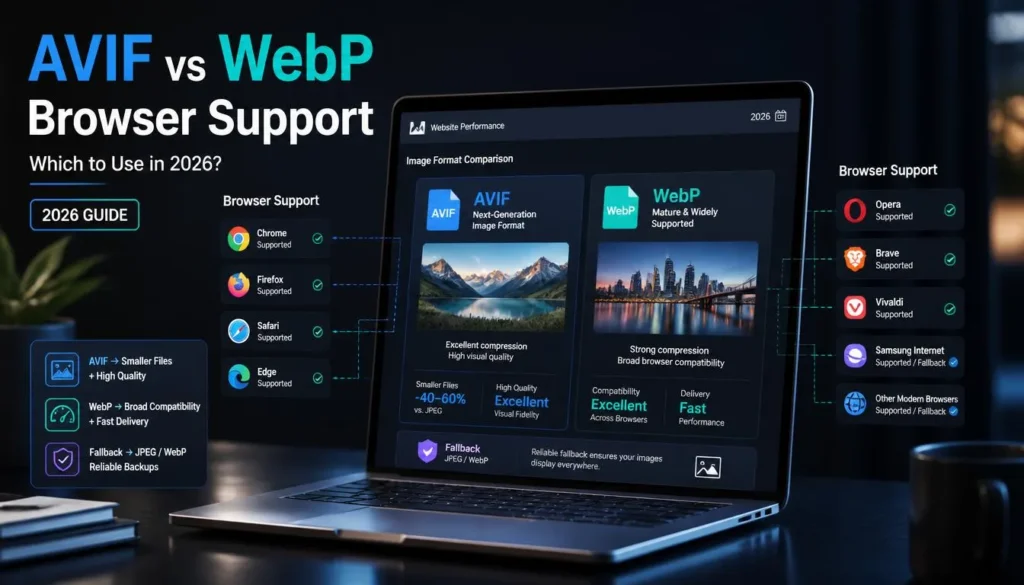
The answer to AVIF vs WebP browser support in 2026 is reassuring: current versions of Chrome, Edge, Firefox, and Safari support both formats. WebP still has the easier compatibility story across older browsers and everyday workflows. AVIF is worth using when its extra compression savings support a real performance goal, and you can provide a fallback.
The Fast Decision
Use WebP when you want a reliable, general-purpose web format that is easy to create, broadly supported, and efficient for most photos and graphics.
Use AVIF when optimizing large photographic images, image-heavy pages, or mobile performance, and serve WebP or JPG as a fallback for older browsers.
For many WordPress sites, the best setup is not choosing one forever. Serve AVIF first where your tools support it, then WebP, and keep JPG or PNG as the final fallback.
That gives modern browsers the lightest available file while preserving a working Image for older environments.
AVIF vs WebP Browser Support in 2026
Both formats are safe for modern public websites.
WebP support is older and more mature. Current versions of Chrome, Edge, Firefox, Safari, and Opera support WebP images. AVIF is also supported by current versions of those major browsers, including modern Safari releases on macOS and iOS.
The difference appears when you account for older devices, outdated operating systems, embedded webviews, and browsers that have not been updated for years.
AVIF has moved beyond the “interesting experiment” stage. Modern browser coverage is strong. Still, browser support is not the only issue. Your actual audience matters.
A travel site targeting users with newer phones may see excellent results with AVIF. A local business site with an older customer base, government-sector traffic, or users on inherited desktop machines should maintain reliable fallback.
How AVIF and WebP Differ
Both AVIF and WebP support lossy and lossless compression, transparency, and animation. Both are designed for efficient web delivery. Their strengths are slightly different.
AVIF often wins when comparing two well-tuned files at a very low target size. A large landscape, detailed architecture shot, or full-width product hero may look cleaner as AVIF than as a similarly sized WebP.
But AVIF is not magic. A badly resized, over-compressed AVIF will still look bad. A huge AVIF file will still waste bandwidth. You need the same good workflow: crop intentionally, resize for the actual layout, then choose the format and compression level.
Why AVIF Can Be Smaller
AVIF uses Image compression technology based on the AV1 video codec. It can preserve visual detail efficiently, especially in photographs with complex textures, gradients, shadows, and color variations.
That matters for images such as:
-
Wide travel and landscape photography
-
Full-bleed homepage hero images
-
Hotel and real-estate galleries
-
Product lifestyle photos
-
Detailed food photography
-
Editorial features with large Image assets
-
Image-heavy landing pages on mobile connections
In real-world web use, AVIF often produces a smaller file than WebP at comparable visual quality. The exact savings vary widely by source Image. A clean studio product shot may show a modest difference. A detailed cityscape with trees, windows, shadows, and clouds may make AVIF’s advantage more noticeable.
Do not rely on an assumed percentage. Test a few representative source images from your own site. One sample is not enough.
Why WebP Still Matters
WebP remains the practical default for many publishers, bloggers, and small business sites.
It produces strong results, has mature browser support, works well for photos and transparent assets, and is usually quicker to encode. If your WordPress Image workflow already generates WebP files smoothly, moving every Image to AVIF may not yield a meaningful improvement given the added setup and testing effort.
WebP is also more convenient when images may leave the website environment. A client, editor, or collaborator is more likely to preview a WebP file than an AVIF file with their existing tools. For email attachments and third-party upload forms, though, JPG remains the safer option.
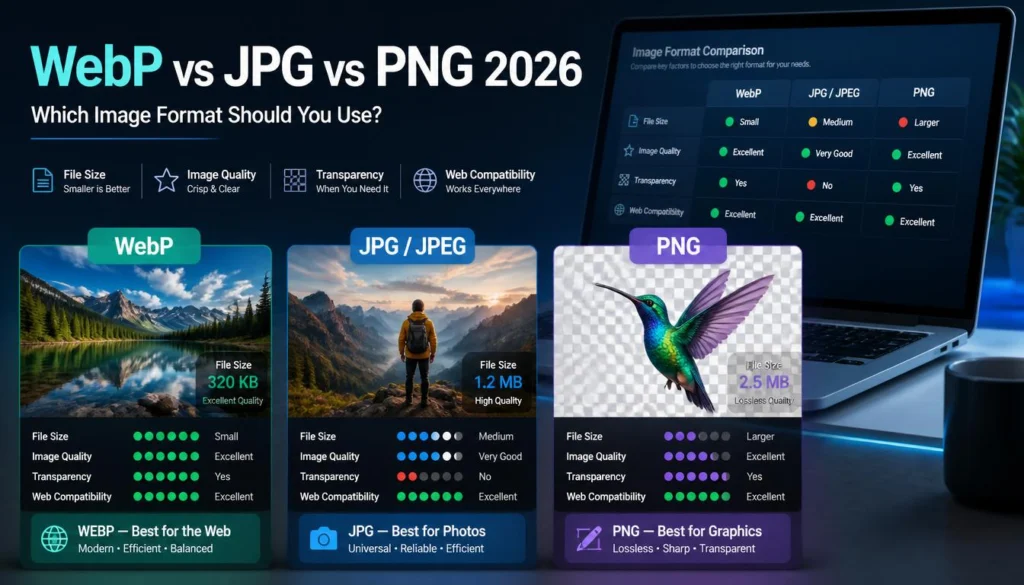
For a broader look at where WebP fits beside JPG, PNG, and AVIF, see WebP vs JPG vs PNG vs AVIF: Which Format Should You Use in 2026?.
When to Use AVIF
Choose AVIF when the Image has enough visual weight that a smaller file creates a meaningful benefit.
A homepage hero Image can affect how quickly visitors see the main page content. If you use a full-width photo at 1,600–2,400px or more, AVIF is worth testing.
Prepare it at the exact maximum width your design needs. Then compare AVIF and WebP side by side at realistic quality settings. Check the main subject, sky gradients, fine foliage, building edges, and shadows. If AVIF is clearly smaller and shows no visible damage, use it with fallbacks.
Image-heavy editorial pages
Travel guides, recipe collections, real estate listings, design portfolios, and fashion stores often feature many large photos on a single page. Small improvements per Image can add up.
AVIF can be especially useful for the first few images that load above the fold. For images far down the page, lazy loading and sensible dimensions may matter more than switching formats.
Mobile performance work
On slower connections, every unnecessary byte affects a page’s perceived speed. AVIF can reduce the transfer size of large photos, which may help pages feel more responsive.
Be careful not to confuse a smaller file with the whole performance solution. Proper width, responsive srcset images, lazy loading below the fold, caching, and stable Image dimensions are still essential.
Sites with automated Image delivery
AVIF is easier to adopt when your CDN, optimization plugin, or build process can automatically generate multiple formats.
The ideal workflow is one source Image that becomes several delivery versions:
-
AVIF for browsers that support it
-
WebP for browsers that support WebP but not AVIF
-
JPG or PNG fallback for older or incompatible browsers
If your tools cannot automate this, manually managing every Image format can become tedious. In that case, WebP alone may be the smarter operational choice.
When to Use WebP Instead
Use WebP when you want strong compression without adding unnecessary workflow complexity.
General WordPress publishing
For standard blog post images, product photos, category banners, and feature graphics, WebP is usually sufficient. It provides a clear improvement over unoptimized JPG files without requiring a complicated fallback strategy on most modern sites.
A well-sized WebP at a sensible quality setting often yields better real-world results than a poorly configured AVIF workflow.
Images that need rapid encoding
AVIF encoding can take longer than WebP, particularly at higher-quality settings or with large Image batches. If you process user-generated uploads, build a gallery on demand, or publish frequent image-heavy updates, WebP may be more practical.
Fast generation matters when the server is under load or when a user expects an uploaded Image to appear immediately.
Mixed graphics and photography
WebP handles photos, transparency, and many graphics well. For a typical site with a mix of featured images, product cutouts, simple visual assets, and Image cards, it can reduce the number of formats you need to manage.
For logos and text-heavy screenshots, keep PNG or lossless WebP in the mix. Lossy WebP is not automatically the right choice for precise edges.
Sites with unknown or older audiences
If you cannot rely on visitors having current browsers, WebP is the safer next-generation format. Add JPG or PNG fallbacks where older compatibility matters.
The same applies to downloadable Image files. A visitor may be using a browser that can display AVIF but still lack convenient desktop software to open it later.
How to Serve AVIF With Safe Fallbacks
A <picture> element lets the browser choose the first compatible format. Place AVIF first, WebP second, and use JPG as the final fallback for a photograph.
<picture>

<source srcset="mountain-lodge.avif" type="image/avif">

<source srcset="mountain-lodge.webp" type="image/webp">

<img src="mountain-lodge.jpg"

alt="Mountain lodge beside a lake at sunrise"

width="1600"

height="1067"

loading="lazy">

</picture>
A browser that supports AVIF loads the AVIF file. A browser that does not support AVIF but supports WebP loads WebP. An older browser falls back to the JPG in the img element.
Use PNG rather than JPG as the final Image fallback when the asset needs transparency.
There are a few important details:
-
Keep the same crop and aspect ratio across each format.
-
Set
widthandheightto help prevent layout shifts. -
Use descriptive
alttext for meaningful images. -
Do not put every Image on the page into one giant source file.
-
Generate responsive widths where possible, rather than sending a desktop-sized Image to every phone.
-
Test the fallback in a browser or device that does not support AVIF before relying on the markup.
If your WordPress plugin or CDN performs format negotiation automatically, check its output rather than assuming it handles fallbacks correctly. Review the page source and browser network panel on both desktop and mobile.
Common Adoption Mistakes
Serving AVIF with no fallback
Modern support is strong, but not universal. Without a fallback, older browsers may display a broken Image icon.
For public sites, AVIF should normally sit at the top of a fallback chain, not replace every other file everywhere.
Converting every asset to AVIF
Photographs are the best initial candidates. Transparent logos, small-text screenshots, icons, and editable design files may require different treatment.
Test the Image type before making a site-wide rule.
Ignoring encoding cost
AVIF can save delivery bytes while costing more time and processing power to create. This is not a reason to avoid it, but it is a reason to automate the work and monitor performance.
If your site generates thousands of Image variations during uploads, consider whether the server or Image service can handle the additional encoding load.
Using only one oversized source Image
A smaller format does not excuse oversized dimensions.
A 3,000px AVIF hero Image may still be wasteful for a phone that only needs an 800px-wide version. Use responsive Image widths and let the browser request an appropriate source.
Comparing formats at different sizes or crops
This produces misleading results.
Compare AVIF and WebP at the same pixel dimensions, with the same crop and intended visual quality. Then check them at the display size used on the actual page.
Treating AVIF as a general sharing format
AVIF is built for web delivery. For client downloads, email attachments, official forms, and broad offline compatibility, use JPG for photographs and PNG for graphics with transparency, unless the recipient specifically requests a newer format.
A Simple Testing Plan
You do not need to convert your entire media library to decide whether AVIF is worthwhile.
Test a small, representative set:
-
One landscape or large hero Image
-
One portrait or lifestyle photo
-
One detailed product Image
-
One Image with smooth color gradients
-
One screenshot or text-heavy visual
-
One transparent graphic, if your site uses them
Create WebP and AVIF versions at the same dimensions. Inspect each at normal page size, then compare the files.
Track:
-
File size
-
Visible detail in high-risk areas
-
Encoding time, if you manage images manually
-
Page rendering and fallback behavior
-
Whether the format works with your CMS, CDN, cache, and backup process
For direct format tests from the same source Image, you can use the ImagArt browser Image converter to generate WebP, JPG, or PNG comparison files. AVIF output should be handled by your site’s Image optimizer or delivery layer if it supports the format.
FAQ
Does Safari support AVIF in 2026?
Current Safari versions support AVIF on modern macOS and iOS releases. Older Safari versions and older Apple operating systems may not support it, so a WebP or JPG fallback remains sensible for public websites.
Is AVIF better than WebP?
AVIF can often produce smaller photographic files at similar visual quality, especially at low file sizes. WebP is usually faster to encode and has a longer, broader history of compatibility. The better option depends on your audience, delivery setup, Image type, and whether the extra AVIF savings are meaningful for your site.
Should I use AVIF and WebP together?
Yes, when your CMS, CDN, or build process can automatically generate and serve fallbacks. A common pattern is AVIF first, WebP second, then JPG or PNG as the final fallback.
Can I replace all JPG images with AVIF?
Not safely in every workflow. AVIF is excellent for modern web delivery, but JPG remains more convenient for email, third-party upload forms, downloadable files, legacy software, and offline sharing.
Is WebP still worth using in 2026?
Absolutely. WebP remains a strong format for general website images because it balances compression, quality, transparency support, broad support in modern browsers, and practical workflows. For many sites, WebP is the simplest high-value upgrade from JPG and PNG.
Use AVIF Where It Earns Its Place
For AVIF vs WebP browser support, the decision is no longer about whether current browsers can render either format. They can. The real decision is whether AVIF’s extra compression savings justify a slightly more demanding encoding and fallback workflow.
Start with large photographic images that affect mobile load time. Serve AVIF first when your delivery stack supports it, keep WebP as the practical fallback, and retain JPG or PNG for older browsers and non-web use. For everyday publishing where you want a simpler, reliable format, WebP remains an excellent choice.