Best Image Format for E-commerce Product Photos in 2026
A 4MB PNG and a 300KB WebP, same product, same monitor, same eyes. Most shoppers can’t tell which is which, and yet one of those files costs you a slower product page every single time someone opens it. That was the comparison that started this whole exercise: 25 product photos, four formats, and a lot of side-by-side squinting.
If you’re hunting for the best Image format for ecommerce, the honest answer is that it depends on the photo. But it depends less than most guides suggest. This article gives you a clear default, the exceptions that actually matter, and a way to decide without running your own 100-file experiment.
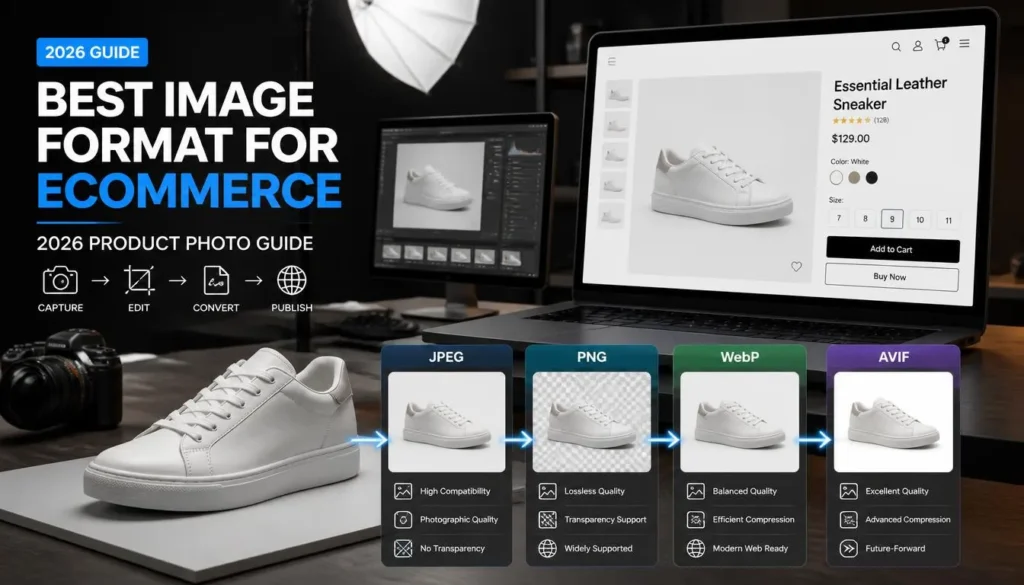
Quick Comparison: WebP vs JPG vs PNG vs AVIF
| Format | Typical file size (product photo) | Quality at normal viewing size | Transparency | Compatibility | Best use |
|---|---|---|---|---|---|
| WebP | Smallest for most photos | Excellent | Yes | All current major browsers | Default for your own store |
| JPG | Roughly 25–35% larger than WebP at similar quality | Very good | No | Universal, including old software | Marketplaces, email, fallbacks |
| PNG | Often several times larger than WebP for photos | Perfect (lossless) | Yes | Universal | Cutouts, logos, graphics with text |
| AVIF | Often smaller than WebP | Excellent | Yes | Good in current browsers, patchy in tools and uploaders | Optional upgrade for tech-savvy stores |
These are typical ranges from my own comparisons, not fixed laws. Results shift with the photo, and I’ll flag where that matters below.
WebP: The Best Default for Most Stores
For the vast majority of product photography, WebP is the right call. Clean white-background shots, lifestyle photos, anything with smooth gradients: they typically come out around 25–35% smaller than a JPG at the same visible quality, and every major browser handles them natively. It also supports transparency, so a single format works for both your standard photos and your cutouts.
Where WebP surprised me: a photo of a knitted sweater with a heavy fabric texture. At high-quality settings, WebP came in almost on par with JPG. Not worse, but not the dramatic savings I’d seen on the flat studio shots. Fine grain and repeating texture are the cases where the gap narrows, so spot-check those.
Quality setting matters more than people expect. For product photos, somewhere around 75–85% is usually the sweet spot. Push past 90%, and the file grows noticeably, while the visible improvement is almost nonexistent. If you want to see how that plays out with specific size targets, the guide on compressing an Image to 100KB without losing quality walks through the trade-offs.
JPG: Still Useful, Just Not the Default
JPG isn’t dead, and treating it that way causes real problems. Amazon, eBay, Etsy, and most marketplace uploaders have their own accepted-format rules, and JPG is the one format you can count on being accepted everywhere. Email newsletters, older CRM tools, and some print-on-demand platforms also behave better with JPG than with anything newer.
My practical rule: keep a JPG version of your hero images on hand even if your own store serves WebP. It costs you almost nothing and saves you the moment an uploader rejects a file with no useful error message.
JPG doesn’t support transparency, so it’s not the right choice for cutouts. And it’s lossy every time you re-save it, so always export from your original file rather than re-compressing an already-compressed JPG.
PNG: Only When You Need Transparency or Sharp Graphics
PNG is lossless, which sounds like a virtue until you see the file sizes. A product photo that would be 80KB as a WebP can easily be 600KB or more as a PNG, with no visible benefit at screen size. For standard photography, PNG is almost always the wrong choice.
It earns its place in a narrow set of cases: product cutouts on transparent backgrounds that you’ll place on different colors, logos, infographics with sharp text, and size charts. Even then, try a lossless or high-quality WebP first. It often handles transparency at a fraction of the weight.
AVIF: Impressive, but Check Your Stack First
AVIF often beats WebP on file size, sometimes by a meaningful margin. It’s a genuinely strong format, and browser support in current versions is solid.
The catch is everything around the browser. I once converted a whole product folder to AVIF without checking the rest of the workflow. The store rendered them fine, but the marketplace uploader rejected them, a plugin’s Image regeneration choked on a few of them, and the team’s design software couldn’t open the files to edit them. Getting the bytes down is only half the job if the rest of your pipeline can’t handle the format.
If your platform, plugins, and team tools all support AVIF, it’s worth testing on a handful of products. If you’re not sure, WebP gives you most of the benefit with far fewer surprises.
Which Should You Actually Choose?
You run your own store and want the simplest, best answer: use WebP for all product photos at around 80% quality.
You sell on marketplaces as well as your own site: WebP for your store, JPG exports for marketplace uploads.
You have cutouts on transparent backgrounds: WebP with transparency, or PNG if a specific tool demands it.
Your catalog has heavy texture (fabrics, leather, brushed metal): Test WebP against JPG on a few samples before converting everything. The savings may be smaller than usual.
You’re technical and want every last kilobyte: Try AVIF on a test batch, but keep WebP fallbacks and confirm your plugins and uploaders cope.
How to Convert Your Catalog Without Losing Quality
Resize first, then convert. Getting a photo down to the dimensions your store actually displays, often somewhere in the 800 to 1200 pixel range for main images, removes far more weight than any format switch alone. Converting a 4000-pixel original to WebP still leaves you shipping pixels nobody will ever see.
Then batch-convert at a sensible quality setting. A browser-based tool like ImagArt lets you run an entire folder through it without installing anything, which is handy when you’re cleaning up an existing catalog rather than starting fresh. Check a few of the results at full size before you replace everything.
FAQ
What is the best Image format for ecommerce product photos?
WebP for most stores. It gives the best balance of small file size, good quality, transparency support, and browser compatibility. Keep JPG versions handy for marketplaces and email.
Is WebP better than JPG for product images?
Usually, yes. It’s typically smaller at similar quality. The exceptions are heavily textured photos, where the gap narrows, and situations where a platform only accepts JPG.
Should I use PNG for product photos?
Only if you need transparency and can’t use WebP. For standard photography, PNG files are far larger with no visible gain.
Is AVIF safe to use for an online store?
Browser support is good, but plugins, marketplace uploaders, and editing tools often lag behind. Test it on a small batch and confirm that your entire workflow handles it before converting the full catalog.
What file size should product images be?
Main product images often work well under roughly 100–150KB, and thumbnails much smaller. Treat that as a starting target and adjust based on how the photo actually looks